Fanuc program transfer over Ethernet, step by step
Every machine on the network, every program sent from one desk. Here's the full path from RS232-era Fanuc controls to networked transfer — without replacing a single control.
The three pieces you need
- A serial-to-Ethernet converter per legacy machine. Small DIN-rail or box units that speak RS232 to the Fanuc port on one side and TCP/IP on the other. Mounted in the cabinet, powered from the machine.
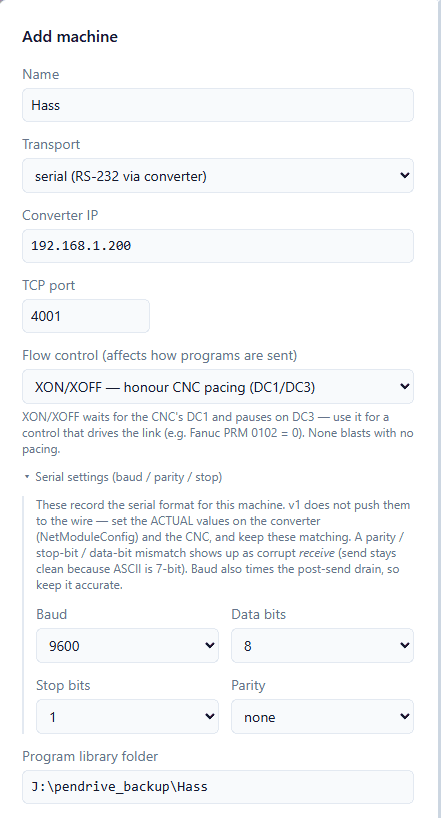
- A shop network with static IPs. Each converter gets a fixed address (e.g. 192.168.1.101 for CNC-01, .102 for CNC-02…) so the DNC server always knows which machine is which.
- DNC server software on one Windows PC. It holds the program library, talks to every converter, and gives operators/programmers one dashboard for send, receive, and drip-feed.
Planning static IPs for 10+ machines
Keep it boring and predictable: one subnet for the shop floor, converter addresses numbered to match machine numbers, and a printed map on the wall. Reserve the range in your router so DHCP never hands those addresses to a phone. That's the whole discipline — and it's what makes a 20-machine floor manageable from one screen.
What about newer Fanuc controls with Ethernet built in?
0i-F and 30i-series controls often have an embedded Ethernet port or FTP option. Those connect straight to the network — no converter needed. Mixed floors are normal: a few new machines direct, the older ones through converters, all feeding into the same DNC dashboard.
Why Ethernet beats long RS232 runs
- Distance: Ethernet doesn't care about 50 m across a floor; RS232 degrades badly past ~15 m.
- Noise: shop floors are electrically hostile — VFDs, welders, spindle drives. Ethernet shrugs; serial corrupts.
- One wire per zone instead of a dedicated serial cable snaking to every machine.
- Every transfer logged in one place instead of scattered across pen drives.
Where ElectronIx DNC fits
ElectronIx DNC is the server piece: a lightweight Rust-based service on an ordinary Windows PC that manages ~25 machines with static IPs, transfers and drip-feeds from one dashboard, and runs headless from boot. Converters, network, software — installed and cutting in a day, not a rewiring project. See the full Fanuc program transfer tool overview for what it does beyond transfer.
Still choosing hardware? The converter buying guide covers what to check before you order, and the RS-232 settings reference has the parameters to match on the control side.