The ElectronIx DNC user guide, free and ungated
Twenty-two pages, eighteen screenshots, every screen in the software. No email required — read it before you install anything, and print it for the shop floor if that is easier.
Why we publish the whole manual
Most DNC vendors will not show you the documentation until you are in a sales conversation. That is backwards. If you are putting software between your programming office and a floor full of machines, you should be able to read exactly what your operators will be asked to do — before you install a trial, before anyone calls you, and without giving us an email address.
This is the same manual that ships with the software and goes out with every trial. It covers the product as it actually is, including the parts that need care.
What is in it
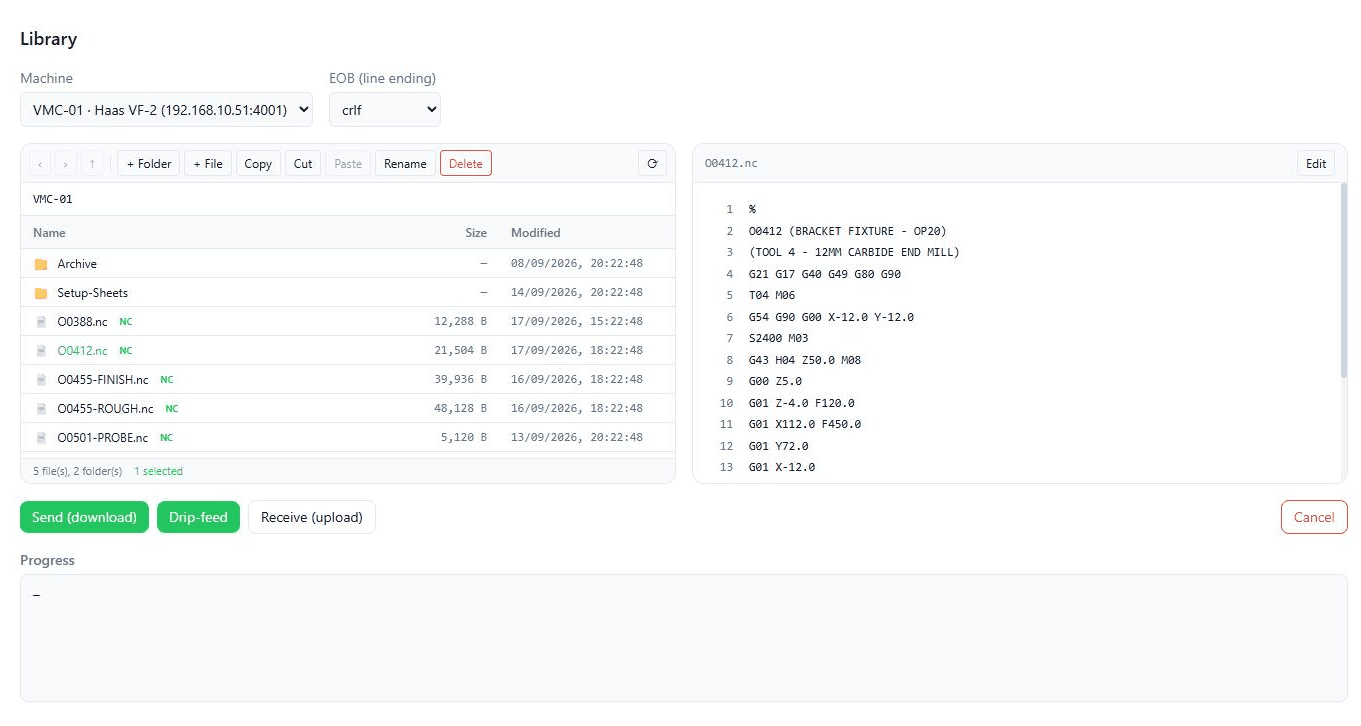
- Sections 1–9, for operators and setters.Signing in, the screen at a glance, Quick Transfer, drip-feeding a program that is too big for the control's memory, receiving a program back off a machine, the per-machine program library, and comparing two revisions before anything is cut.
- Sections 10–19, for supervisors. Registering a machine, remote request (the operator calls a program up from the CNC keypad), the built-in FTP server, the flow and activity logs, user accounts and roles, licensing and updates.
- Section 20 — troubleshooting. A symptom-to-cause table for the things that actually go wrong on a serial line.
- Section 21 — good practice. The short list worth pinning up next to the PC.
The two ways a machine connects
Section 2 of the guide explains this in full; the short version decides what hardware you need, so it is worth knowing before you read anything else.
- Serial (RS-232). For any control with a punch and read port. The PC dials a serial-to-Ethernet converter on the machine panel over your LAN, and the converter turns that into RS-232. Nothing on the machine or the control is modified.
- FTP (Ethernet). For Fanuc controls with the Ethernet option. The PC hosts an FTP server and the control connects to it as a client, with its own login and its own program folder. No converter needed. See Fanuc program transfer over Ethernet.
A floor with 1990s machines and last year's machines runs both at once, on one install.
The troubleshooting table, in short
Section 20 is the page most shops end up using. These are the four that come up most often:
- A received program is rejected. Baud rate, parity, data bits and stop bits must match on the converter and on the control. A send of plain ASCII often survives a mismatch that a receive does not — see Fanuc RS-232 parameter settings.
- Send fails — the converter did not answer. Check the converter is powered and on the network, that its IP and port match the registry, and the cable at the panel.
- A drip-feed stops part way. The control stopped asking for data. The flow log shows the XON/XOFF handshake, so you can see whether it paused or the link dropped — see drip-feeding a Fanuc.
- The program was sent but the control shows nothing. The control was not in read mode, or it expects a different end-of-block character.
Read the guide, then try it on one machine
The trial is the full product — two machines, thirty days, FTP or serial or one of each. The same guide is attached to the download email. If something will not connect, tell us the machine make and control series and we can usually sort it in minutes; our team can also join you remotely or on site.
More background: what DNC means in CNC, what DNC software costs in India, and DNC software for Fanuc controls.